
When you create a Client Listing, the A3T system also creates a storage folder for documents connceted with that client.
 Documents include contracts, bills, receipts, letters, screenshots, photos and graphics.
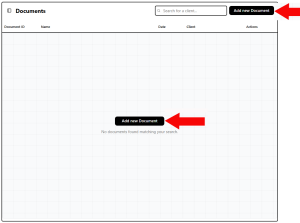
The first time you open the Document section you will see this invitation to add a new document. Click on either button. That will open the next screen shown below.
Of course if you have already strored documents here, there will be a Document List. Clicking on a listed Document will open it on your screen. From their you can print a copy or send it to someone as an email attachment.
Scroll down to see the upload screen.
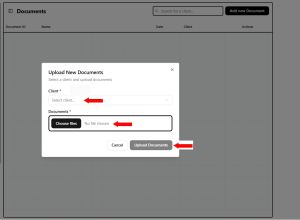
This popup makes it simple to uplod a document. After you upload, it will appear in the Document List.