After a successful 2FA login, A3T default opens to the Job List (Dashboard) of upcoming Jobs in chronological order. Admin can see open time and available Staff. Click to enlarge all screenshots in the Guide. Toggle in header displays all Jobs, past and future.
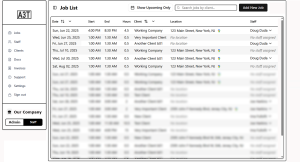
- Job List is chronologically reversible
- Job List is searchable, returns Client History
- Admin can see open time slots at a glance
- dropdown under Staff shows all assigned to this Job
- Click on New Job button (upper right)
- Click on a row to open Job Details
Click on the icon to toggle the sidebar menu. Improves a small screen view.