
Invoices are created from a Job page. Click “Create Invoice” button in the header.

That click launches a draft version of an invoice. This draft is partially filled out to give you a headstart. It needs only a few details.
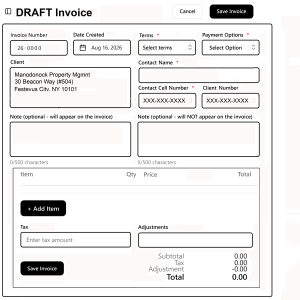
- Invoice number auto-inserted
- terms (when due) auto-inserted
- payment method auto-inserted
- Client info auto-inserted
- Contact name auto-inserted
- Phone numbers auto-inserted
- Enter Item, QTY, Price
- result auto-calculated
- add as many rows as needed
- rows auto-calculated
- coumns auto-calculated
- add optional notes
- add taxes and adjustment(s)
Click Publish Button and the invoice wiill be created and attached to a new email ready for editing and sending.
Invoices are automatically archived and displayed with aging on the Invoice List.
NOTE: Admin has option, at Account Settings, to chose the default invoice numbering system, Terms and Payment Method for all invoices – but Admin may override and apply a different setting for this particular Invoice. Changing options for this Invoice will not change any past or future invoice.