
There are THREE sections to the New Job screen.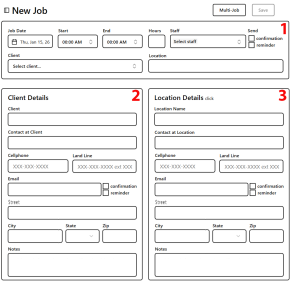
- the 2-row header where you enter New Job date and time. Also assign Staff to the Job. Client selection is from popup list (or link to create new Client listing.)
- Client Details. This section is auto-populatedwhen client is selected in Section1
- Location – depending on the situation, this section may be auto-populated
Click on Save in the upper right corner. An attempt to close a Job page before saving will trigger a popup with options to save or abandon recent edits.
The New Job and Edit Job pages are identical. Only the title changes.